• Skip to primary navigation
  • Skip to main content
  • Skip to primary sidebar

FAQ

Frequently Asked Questions

  • Home
  • Contact Us

How do I view my schedule?


  • Step 1: Log in to your MDConnect Student Center
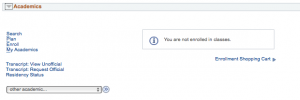
  • Step 2: The ‘Academics’ section of the Student Center will provide a view of your current term schedule. You may click the ‘Other Academic…’ option, and then select ‘Class Schedule’ to view your schedule.
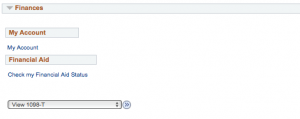
  • You may scroll down to the ‘Finances’ section and click ‘My Account’ to print a copy of your Fee Invoice for a printable version of your schedule
Last Updated: 5 years ago in Registering for Classes Tags: mdconnect

Primary Sidebar

Topics

  • About MDC
  • Academics
  • Admissions
  • Advisement
  • Canvas LMS
  • Financial Aid and Scholarships
  • Graduation
  • Human Resources
  • MDC Online
  • Multi-Term Enrollment
  • MyMDC Account
  • Registering for Classes
  • Student Life
  • Technical Help and Support

Most recent articles

  • Will I be able to view classes prior to the beginning of enrollment?
  • What happens to my Florida residency if I have not attended classes for three terms but have future enrollment?
  • In a hypothetical scenario, if I drop all fall semester courses within the 100% refund period but remains enrolled for spring semester, would the tuition payment (made out-of-pocket) be refunded or carried forward to the spring 2028 balance?