• Skip to primary navigation
  • Skip to main content
  • Skip to primary sidebar

FAQ

Frequently Asked Questions

  • Home
  • Contact Us

How can I see what holds I have on my account?


  • Step 1: Log in to your MDConnect Student Center
  • Step 2: The ‘Holds’ box on the right-hand side of the page will inform you if you have anything preventing you from enrolling or receiving official transcripts
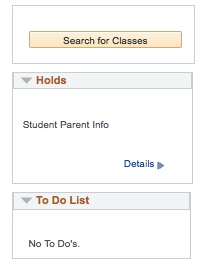
  • If you have a hold, click on the ‘Details’ link to view more information, such as the reason and instructions on how to resolve the hold
Last Updated: 5 years ago in Registering for Classes Tags: mdconnect
18 71

Primary Sidebar

Topics

  • About MDC
  • Academics
  • Admissions
  • Advisement
  • Canvas LMS
  • Coronavirus
  • Financial Aid and Scholarships
  • Graduation
  • Human Resources
  • MDC Online
  • MyMDC Account
  • Registering for Classes
  • Student Life
  • Technical Help and Support

Most recent articles

  • Can I work at the new Freedom Tower?
  • My family has documents or objects that relate to the history of the Freedom Tower. Can I donate them to the new museum?
  • I have stories about my family’s experience in the Freedom Tower. Can I share them?